
Delete changes the page instead of covering it
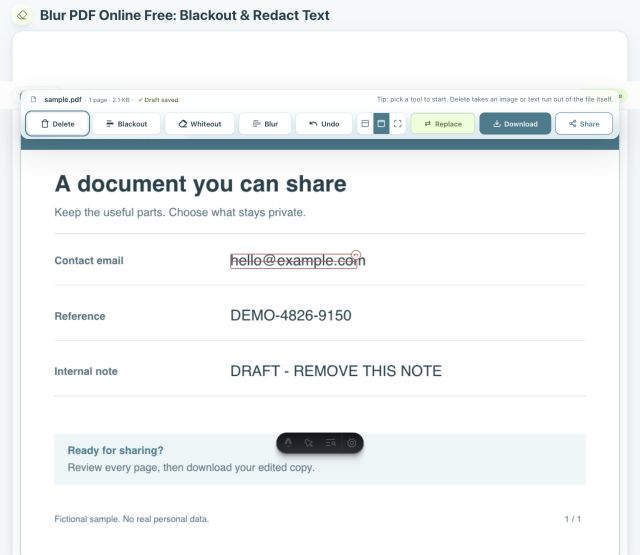
Choose Delete and the editor highlights the text and image elements it can remove. Click one and Download creates a PDF without that selected element on the page. The other text, lines and images remain where they were. A Delete-only page stays selectable and searchable because it is not flattened into a picture.
If a link sits over the element, like the clickable footer a scanning app adds, the link is removed too. The downloaded copy also leaves out the original file's details: its title, author, the app that made it and when. After Download, PDkef searches the saved file for the words you choose, including inside link addresses, so you can see for yourself what is left. The CamScanner footer guide walks through one real example.
What can you do with PDF Delete?
Delete an old name, email, date or answer. Download, then open the result in Sign & Fill PDF to enter the new value.
Remove an outdated heading, duplicate line, obsolete price, draft note, or other text block while leaving the rest of the document intact.
Take out a detected logo, photo, stamp or image placement without turning the entire page into a flat image.
PDFs do not always store text one word at a time, so the highlight shows the exact element a click will remove. It may be a word, line, or larger text run. If a scanned page appears as one large image, use Whiteout to clear only the area you want to replace.
Delete an element and replace it with new content
- 1Open the Redact tool and choose Delete. The PDF stays on your device while the removable text and image elements are highlighted.
- 2Click the complete element you want removed. Mark more elements if needed, or use Undo before downloading if you selected the wrong one.
- 3Download the edited PDF. To replace a form value, open the new copy in Sign & Fill PDF, add the new text, position it, and download again.
Your original file is not overwritten. Download creates a new copy, and the local draft lets you return to the editor and make another version.
Delete, Whiteout, Blackout and Blur each have a job
| Tool | Result | Example |
|---|---|---|
| Delete | The selected element is removed; other page text stays searchable | Remove a prefilled answer or an old logo |
| Whiteout | A clean-colored cover is flattened into the page | Clear a scanned form field before writing over it |
| Blackout | A solid visible cover is flattened into the page | Show that a name or reference was withheld |
| Blur | The selected visual detail is softened and flattened | De-emphasize a face, signature or screenshot detail |
See each option in the visual guide to Delete, Whiteout, Blackout, Blur and flattening. You can combine the tools in the same PDF and make a different choice for each element.
Delete PDF elements with no upload or account
PDkef processes the document in your browser. There is no signup, watermark or paid tier, and the code is open source under the MIT license. Read how to verify local PDF processing, or install PDkef for offline use after its required assets have loaded.