
Pixel dimensions first, JPEG quality second
A photo is one image, not a page count, so a small cap is usually reachable, unlike a ten-page scan asked to fit the same number. What decides whether it actually reaches that number is two things, in this order: the pixel dimensions of the image, then the JPEG quality used to encode it. The measured rows further down this page show it holding even at 10 to 20KB.
A phone camera shoots at something like 4000 by 3000 pixels. At that size, no amount of quality reduction gets you near 50KB, because a JPEG that large still carries a lot of pixel data even at its roughest setting. The same photo resized down to about 600 pixels wide fits a small target easily, because there is simply far less pixel data left to encode. Size the image down first, then let quality do the rest.
Compress Image will not crop your photo to an exact pixel size
Compress Image hits a KB target by walking down a scale ladder and searching JPEG quality at each step, trying each scale before giving up more detail. It does not crop or resize to a specific width and height you name. Its job is getting a file under a size limit, not matching a pixel grid.
Many portals check both at once. IBPS asks for a photograph at 200 by 230 pixels and a signature at 140 by 60 pixels, on top of the KB range. If your form states pixel dimensions as well as a size limit, crop to those dimensions first, with your phone's own crop tool or any image editor, and only then bring the cropped file under the KB cap here. Cropping after compressing does not keep the size you just reached: the crop tool saves the file again at its own quality setting, so you would have to compress a second time anyway. The signature and portrait rows measured further down this page, at a 10KB target, show exactly what that costs in sharpness.
What compressing a photo changes, stated plainly
The output is always a JPEG, whatever format you started with. A transparent PNG is flattened onto a white background first, since JPEG has no transparency of its own. Re-encoding also drops EXIF metadata, including the location a phone camera often records, along with the camera model and timestamp. A screenshot or a photo of a page of text can show visible artefacts around the letters once the target gets small, more so than an ordinary portrait photo. If your file is already under the target, it is returned completely unchanged.
Real phone photos, run through Compress Image
| Document and target | Original size | Result | Still usable? |
|---|---|---|---|
| Portrait photo (phone selfie, JPEG), at 50 KB | 867 KB | 50.1 KB | Yes, crisp, indistinguishable from the original at phone size |
| Same portrait, at 20 KB | 867 KB | 19.5 KB, 1088x1932 | Yes, fine, slight softening only when zoomed in |
| Same portrait, at 10 KB | 867 KB | 9.8 KB, 725x1288 | Face recognisable but soft and blocky in hair and skin; usable as an ID photo, but far larger than the 200x230 px IBPS asks for |
| Signature on paper, photographed uncropped (JPEG), at 20 KB | 589 KB | 20.4 KB, 1088x1932 | Yes, legible, strokes soft |
| Same signature, at 10 KB | 589 KB | 10.1 KB, 725x1288 | Legible but soft, with a faint halo around the strokes; most of the 10KB went on blank paper, not the signature |
| One-page printed letter, photographed (JPEG), at 100 KB | 1.15 MB | 90.2 KB | Yes, crisp, body text fully sharp |
| Same letter, at 50 KB | 1.15 MB | 48.9 KB, 1088x1932 | Yes, fully readable with mild softening |
| Screenshot of a text web page (PNG, re-encoded to JPEG), at 50 KB | 636 KB | 49.0 KB, 968x2097 | Headings sharp; body text readable but visibly softened with faint ringing at letter edges; small grey text is borderline |
Here is what that actually looks like on a real phone photo: the same picture, as taken and brought down to 20 KB. Left is the original, right is the 20 KB file, and you are looking at the actual output, not a mock-up. Look at the far ridges on the right: at 20 KB the haze goes blotchy and slightly purple, while the lake and the forest still read. That is the real trade at a 20 KB cap on a wide landscape; a passport-style photo has far less detail to lose.
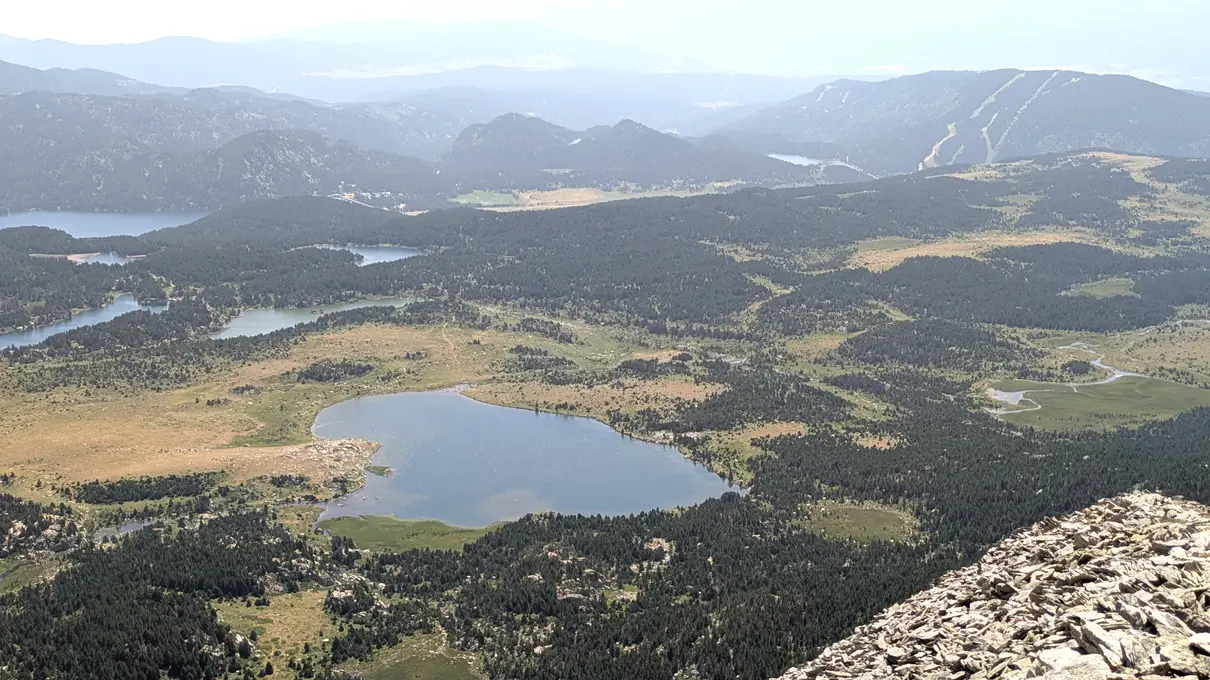 Original20 KB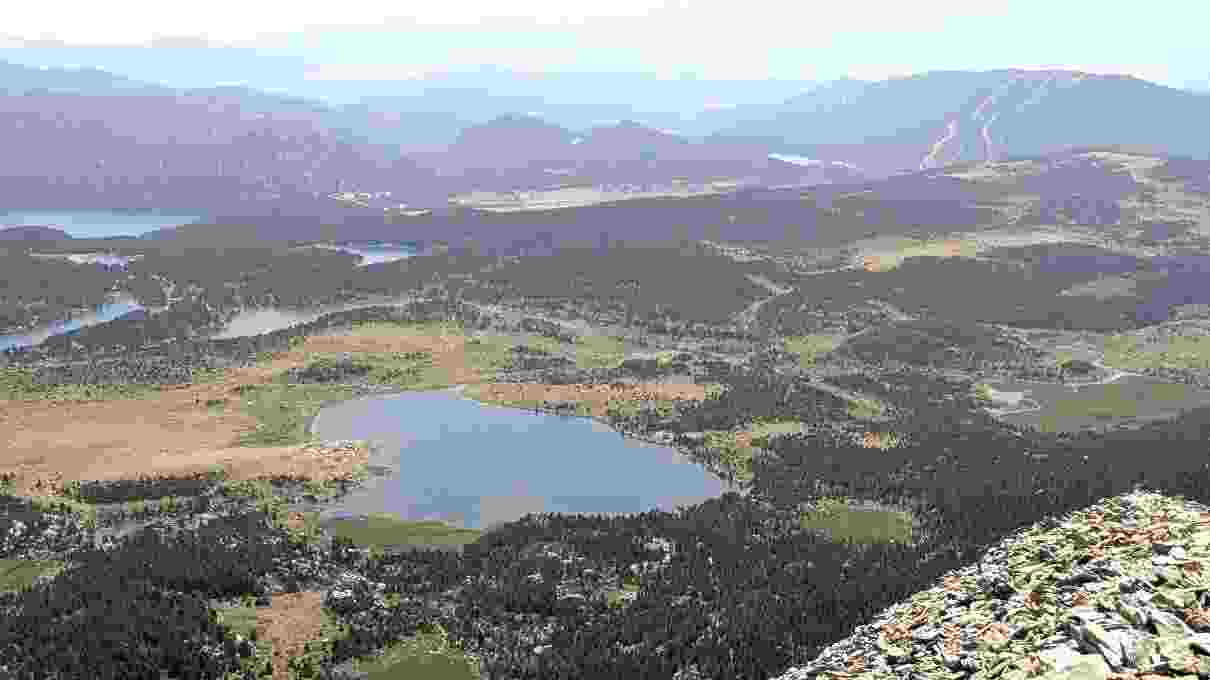
All three photos here are as uploaded from a phone, 1450 by 2576 pixels, not raw camera files; a shot straight off the sensor is bigger still, commonly 3000 by 4000 pixels or more. The portrait and letter rows above are the same fact stated two ways: a photo is one image, not a page count, so a face or a page of text can still reach 10 to 20KB, somewhere a multi-page scan never gets close to. What moves is dimension, not just quality. Compress Image searches JPEG quality at full size first, and only steps down its fixed scale ladder (1, 0.75, 0.5, 0.3, 0.15 of the original pixels) once quality alone cannot clear the target, which is why the 100KB letter row above keeps the full 1450 by 2576 frame and the 50KB row does not.
The signature row is the clearest proof of the crop-first warning above it. At 10KB, nearly all of that budget went on the blank paper around the strokes, because the compressor has no idea the signature is the only part that matters, it only shrinks the whole photo, it never crops. The same thing happens to the 10KB portrait: the result is recognisable well past the 200 by 230 pixels IBPS actually asks for, and cropping to that pixel size first would spend the same 10KB on a tenth of the pixels and come out sharp instead of soft.
Real portals, and the size limits they actually publish
| Portal | What it caps | Documented limit |
|---|---|---|
| IBPS (bank recruitment exams) | Photograph upload | 200 by 230 px, 20KB to 50KB, JPEG |
| IBPS (bank recruitment exams) | Signature upload | 140 by 60 px, 10KB to 20KB, JPEG |
| NTA UGC-NET (and similar NTA exams) | Candidate photograph upload | 10KB to 200KB, JPEG |
| NTA UGC-NET (and similar NTA exams) | Candidate signature upload | 4KB to 30KB, JPEG |
| UPSC (CAPF exam, and similar UPSC exams) | Photograph upload | 20KB to 200KB, JPG |
| UPSC (CAPF exam, and similar UPSC exams) | Signature upload | 20KB to 100KB, JPG |
IBPS's own candidate portal states a photograph between 20KB and 50KB at 200 by 230 pixels, and a signature between 10KB and 20KB at 140 by 60 pixels, both JPEG (ibps.in candidate portal, photograph and signature guidelines). The same portal caps a combined document PDF at 500KB, covered on why a PDF won't compress to 100KB.
The National Testing Agency's UGC-NET information bulletin specifies a 10KB to 200KB photograph and a 4KB to 30KB signature, both JPEG, quoted directly from its published information bulletin.
UPSC's own CAPF exam notice states a photograph file that should not exceed 200KB and must not be less than 20KB, and a signature file between 20KB and 100KB, both JPG, quoted from its published exam notice. These figures were set years ago for slow connections and small server quotas, and most have outlived the reason they exist, but the portals still enforce them.
What to try before you give up
- 1Crop tighter first. If the portal states pixel dimensions as well as a KB range, crop to those dimensions before compressing, not after.
- 2Check whether the cap really is that low. Portal instructions are sometimes copied from an older cycle; look for the current one before assuming your file has to hit the smallest number you found.
- 3Use a plain background. A flat white or light background behind a portrait or a signature gives JPEG far less detail to encode than a cluttered one, for the same visual quality.
- 4Take the photo in good, even light. A noisy low-light photo forces JPEG to spend more of its budget on grain instead of the subject, which is the first thing that gets lost at a small target.
Try it on your own photo before you crop anything
Open the free image compressor, enter the target your form actually asks for, and check the result. The photo never leaves your device, so there is no upload wait to find out whether it fits, and no account to create first. If the form also caps a scanned document, the same question for PDFs covers that half, and how to scan a document to PDF shows how to make the scan in the first place.